As a UPLB student, I experienced, and suffered through, both enlistment systems: the Oracle PeopleSoft Campus Solutions-powered Student Academic Information System (SAIS) during my Freshman year, and our “homegrown” Academic Management Information System (AMIS). Three years on, and despite some improvements, many students still encounter the infamous 502 Bad Gateway error during the enlistment season.
Back in January 2024, I volunteered as a student tester for AMIS and shared feedback on several concerns I had. The invitation asked volunteers to sign in to a separate development instance and simply re-enlist the classes we were already taking that semester, within a roughly one-week window, so that any bugs encountered along the way could be reported back to the team.
Following that, I raised one minor suggestion:
AMIS Project DTP UP Los Banos wrote on Jan 11, 2024, 2:27 PM:
Good day,
S: " Please consider including a button to toggle all the accordion/collapse cards in the active enlistment section of the student enlistment module, similar to how the section used to behave before the recent update. It is a hassle to click on each card individually just to view more details, particularly the name/s of the FIC in a class. Or better yet, a way to completely disable the collapse cards and just show everything at once. Thanks! "
A: Just wanted to say a big thanks for sharing your suggestion with us. We appreciate your input and will definitely consider it to make things better. Thank you for your understanding.
Best regards,
AMIS Support Team
Two and a half years later, this suggestion still hasn’t been implemented. For the greater part of my undergraduate journey, I refrained from sharing the rest of my observations. I had my academic work to focus on, didn’t feel it was my place, and was unsure whether unsolicited technical feedback would be useful, figuring they’d eventually catch these issues on their own. Now that I’ve completed my degree (congratulations, Class of 2026!), having gone through six semesters and two midyear terms with this system, however, I believe I have the standing needed to discuss some of the architectural problems with this platform.
Given how long enlistment has been a pain point for UPLB students, I figured it was worth writing this down properly.
The Issue
Most web developers today place limited emphasis on optimization. Although computer science curricula spend significant time on time complexity and performance analysis (CMSC 142 flashbacks intensify), this knowledge is often forgotten thereafter. As a result, performance-related issues have become increasingly common in modern web applications. The performance problems observed in the AMIS front-end can be attributed to three (3) primary causes: (a) CORS configuration that prevents preflight caching, (b) too many API requests, and (c) inadequate handling of failed API requests in the front-end.
Before I continue, what is CORS (Cross-Origin Resource Sharing) anyway? It is a browser security mechanism that controls whether a web page is allowed to request data from a different domain than the one it was loaded from. Since AMIS’s front-end and its API live on different subdomains (api-amis.uplb.edu.ph, amis.uplb.edu.ph), the browser first sends a preflight request (OPTIONS) to check whether the server permits the request, before sending the actual one. If the server’s response says it’s fine, and tells the browser how long to remember that answer, the browser can skip asking again for a while. That’s where the Access-Control-Max-Age header comes in.
Point A: CORS
Speaking as a volunteer developer for a niche web browser who has modified and reviewed CORS-related code directly, I can attest that AMIS’s CORS configuration is unusual. Due to how the API responds, unnecessary CORS preflight requests are made, which, in practice, double the number of requests per API call made by the front-end, as shown in Table ?. Whether this is an intentional configuration choice or simply an oversight, the effect is the same. The server sets the HTTP header Access-Control-Max-Age to 0, meaning the browser will never cache the preflight response and will instead issue a new preflight request with every API call, as shown in Figure ?.
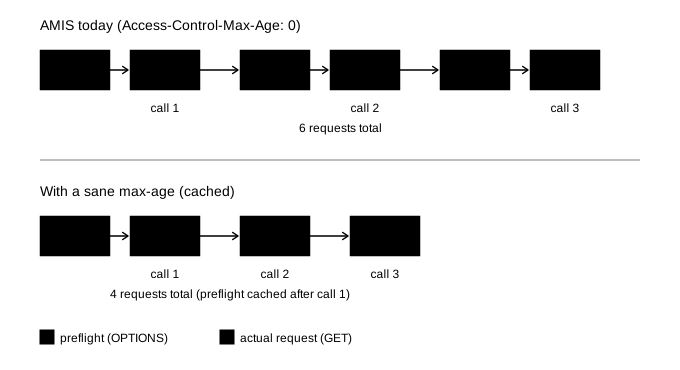
Imagine asking your mom, “Can I have a cookie?” and she says yes. Normally, you’d just go get the cookie. But here, it’s as if you have to ask “Can I have a cookie?” again, every single time, even if she just said yes two seconds ago, before you’re allowed to actually take one.
There are several ways to resolve this:
Disable CORS (not recommended). This is undeniably risky, but I have used it to observe how much of the delay comes from repeated preflight requests, since it is the only client-side comparison available to users. Not all browsers support this. Firefox refuses to proceed whenever a preflight request is deemed “necessary,” if CORS is disabled. This was actually something I patched myself in the niche browser mentioned earlier, which was forked from Firefox. Chrome and its derivatives, on the other hand, works as expected under this configuration. All preflight requests are skipped if you launch it with the
--disable-web-securityflag alongside a custom profile directory via--user-data-dir.However, never browse the general web with CORS disabled! To wit: it only removes a browser-side check on your own machine. It doesn’t touch the server, doesn’t grant access to anything you couldn’t already retrieve while logged in, and has no effect on any other student’s session or data.
Use a sane
Access-Control-Max-Agevalue. This can only be done by the server administrator (in this case, the AMIS developers). Preflight requests would still be made, but not at the current, excessive frequency of once per API call.Drop the subdomain and proxy all API requests through the same origin as the main web application. This is standard practice among modern, data-heavy web applications (e.g., BPI Online, Claude AI), and for good reason. As Stack Overflow user André C. Andersen points out, most API requests today include an
Authorizationheader, useapplication/jsonas the content type, or both, which trigger a preflight check. In practice, this means preflight requests are not occasional, but nearly unavoidable. As a result, serving the API from the same origin as the front-end is currently the most reliable way to avoid them entirely, which is unfortunate, since there are legitimate architectural cases where separating hosts would otherwise make sense.
Preflight Overhead
| Metric | Measured (low traffic) | Rough peak estimate |
|---|---|---|
| Preflights per load | 8 | 8 |
| On warm connection | 4 (~38 ms each) | fewer, as concurrent users compete for the connection pool |
| On fresh TCP+TLS handshake | 4 (~107 ms each) | most/all 8, plus queuing delay |
| Total preflight time per load | 581 ms | ~1,300 to 1,700 ms |
| Aggregate, 3,000 users x 1 load | ~29 min | ~65 to 85 min |
A single page load captured from the enlistment module showed 8 preflight requests adding roughly 580 milliseconds of overhead. The significance is at the aggregate level. Scaled to 3,000 students loading the page once, this adds up to roughly 29 minutes (best case) of overhead across the system, time spent by the server processing requests that are just permission checks. Under peak load, when far more requests compete for the same limited connection pool, this could plausibly rise to somewhere in the 65 to 85 minute range. However, the third column is only an estimation, since I was unable to collect a HAR capture during the actual enlistment period.
Point B: Too Many API Requests
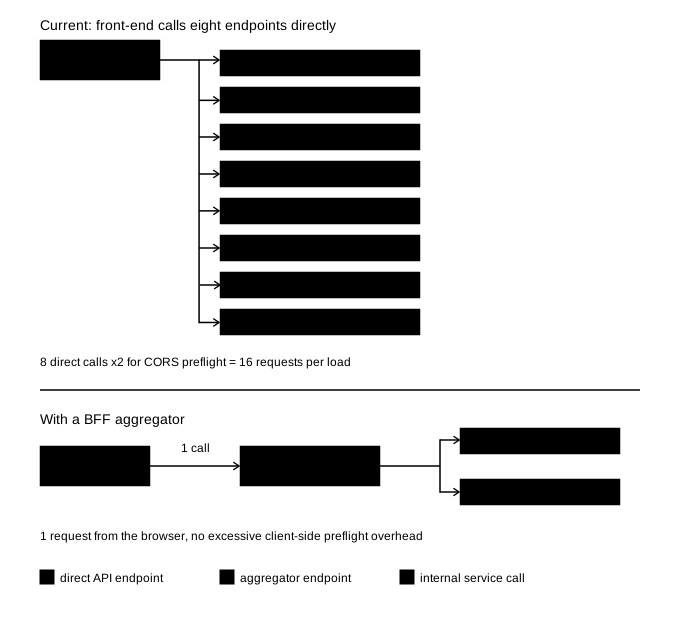
The most immediate issue is the excessive number of API requests made by the AMIS front-end. The enlistment module alone issues eight (8) requests to retrieve student-specific data that should have already been cached by the application. In practice, this number doubles to sixteen (16) requests, since each GET request is accompanied by an automatic OPTIONS preflight request issued by the browser.
To put this in perspective: if even 3,000 students attempt to enlist within the same hour at the start of the first day of pre-registration, a common occurrence at UPLB, that alone amounts to roughly 48,000 requests hitting the API for this single module, half of which (24,000 requests) are preflight requests that carry no actual data. This is a potential contributor to the 502 Bad Gateway errors mentioned earlier. As Cloudflare’s documentation notes, excessive server load is one of the primary causes behind this class of errors. Reducing or getting rid of the preflight requests would generally improve performance, since these requests add overhead.
| Status | Method | Domain | Request | Initiator | Type | Size | Transferred |
|---|---|---|---|---|---|---|---|
| 204 | OPTIONS | api-amis.uplb.edu.ph | student_enlistment?role=student | xhr | html | 476 B | 0 B |
| 200 | GET | api-amis.uplb.edu.ph | student_enlistment?role=student | 3446b90.js2 (xhr) | json | 650 B | 295 B |
| 204 | OPTIONS | api-amis.uplb.edu.ph | enlistment_finalization?role=student | xhr | html | 476 B | 0 B |
| 200 | GET | api-amis.uplb.edu.ph | enlistment_finalization?role=student | 3446b90.js2 (xhr) | json | 650 B | 295 B |
| 204 | OPTIONS | api-amis.uplb.edu.ph | student-holds?status=Open&is_positive_indicator=false&for_er… | xhr | html | 476 B | 0 B |
| 200 | GET | api-amis.uplb.edu.ph | student-holds?status=Open&is_positive_indicator=false&for_er… | 3446b90.js2 (xhr) | json | 375 B | 20 B |
| 204 | OPTIONS | api-amis.uplb.edu.ph | contents?title_in[]=student+enlistment+alert&title_in[]=student… | xhr | html | 476 B | 0 B |
| 200 | GET | api-amis.uplb.edu.ph | contents?title_in[]=student+enlistment+alert&title_in[]=student… | 3446b90.js2 (xhr) | json | 596 B | 241 B |
| 204 | OPTIONS | api-amis.uplb.edu.ph | student-terms?order_type=DESC&order_field=ay | xhr | html | 476 B | 0 B |
| 200 | GET | api-amis.uplb.edu.ph | student-terms?order_type=DESC&order_field=ay | 3446b90.js2 (xhr) | json | 73.71 kB | 73.36 kB |
| 204 | OPTIONS | api-amis.uplb.edu.ph | enlistments?enlistment_user_id=<redacted_guid> | xhr | html | 476 B | 0 B |
| 200 | GET | api-amis.uplb.edu.ph | enlistments?enlistment_user_id=<redacted_guid> | 3446b90.js2 (xhr) | json | 578 B | 223 B |
| 204 | OPTIONS | api-amis.uplb.edu.ph | enlistment_addition_only?role=student | xhr | html | 476 B | 0 B |
| 200 | GET | api-amis.uplb.edu.ph | enlistment_addition_only?role=student | 3446b90.js2 (xhr) | json | 650 B | 295 B |
| 204 | OPTIONS | api-amis.uplb.edu.ph | students?student_enlistment_info=true&term_id=<redacted_term> | xhr | html | 476 B | 0 B |
| 200 | GET | api-amis.uplb.edu.ph | students?student_enlistment_info=true&term_id=<redacted_term> | 3446b90.js2 (xhr) | json | 3.47 kB | 3.12 kB |
Several of these resources, including user information and list of all academic terms, are either static or change infrequently and should therefore be cached on the client side. Repeatedly fetching the same data appears inconsistent with common front-end performance practices, namely proper use of HTTP caching and client-side state management, where data already fetched should be stored in the application’s state and reused rather than requested again, especially if it doesn’t change often. Ignoring these unnecessarily increases server load.
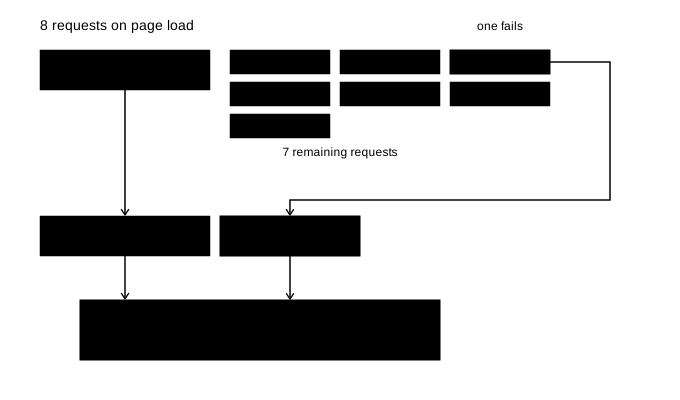
Moreover, three (3) of the eight (8) core requests appear to exist solely to check feature availability, e.g., whether the “Finalize” or “Enlist” button should be enabled or disabled. It’s worth reconsidering why a simple state check requires multiple separate round-trips to the server, rather than being consolidated into a single request. Compounding this, the failure of just one of these requests can leave the entire enlistment module stuck in an infinite loading state, appearing unresponsive even though nothing is actually happening behind the scenes. This is a symptom of the error-handling issues discussed further in the next section.
Imagine going grocery shopping, but instead of writing a list and making one trip, you drive to the store, buy just the milk, drive home, then drive back for eggs, then back again for bread, and so on. Eight separate trips for eight items you could have grabbed in one. Worse, on trip four you’re asked for your name and address again, even though you gave it on trip one and nothing about you has changed. That’s what the enlistment module does every time it loads: eight separate round-trips for data that could largely be fetched in one, some of which (like your own student info) didn’t need to be asked for again at all.
A more sensible approach would be to introduce an aggregator endpoint on the backend, following the Backend-for-Frontend (BFF) pattern, also related to the Gateway Aggregation pattern. This could potentially merge these requests into a single API call instead of eight, combined with proper client-side caching of infrequently changing data such as student information, as shown in Figure ?.
Point C: Inadequate error handling and error recovery, or the lack thereof
Another area with room for improvement is the front-end’s handling of failed API requests. When requests fail, users are shown a vague “contact your administrator” notification that provides no actionable guidance. This inadequate error handling forces users to retry all requests, often by manually refreshing the page or navigating back and forth between modules. In both cases, the entire set of requests is re-issued, including those that had previously succeeded. A more robust approach would allow users to retry only the failed requests, reducing unnecessary network traffic. Caching previously fetched data client-side so it can be reused if a subsequent API call fails can also be considered.
Furthermore, critical user actions such as enlistment can be unnecessarily blocked when non-essential data fails to load. From the user’s point of view, the request most directly tied to rendering the core of the enlistment module appears to be <api>/enlistments?enlistment_user_id=<redacted_guid>&term_id=<redacted_term>&enlistedClasses=true, as shown in Figure ? (and in truncated form in Table 1). This returns a JSON containing the current term ID and all bookmarked and enlisted classes. The front-end prevents interaction even though the backend already contains sufficient validation logic (i.e., enlistment is already blocked if the user has holds). Allowing users to proceed with enlistment while delegating final validation to the API, which it already does, would improve usability.
FAQ: Do Alternative Browsers Matter?
Not really.
Browsers like Opera, Brave, Edge, Vivaldi, and even Arc are all built on top of Chromium and its underlying Blink rendering engine, the same engine that powers Google Chrome itself. While these browsers may differ in UI, built-in features, or extensions, their core networking and rendering behavior, including how they handle CORS preflight requests, caching, and JavaScript execution, is fundamentally identical, since they all inherit it from the same upstream codebase.
In other words, if AMIS is slow on Chrome, it will be equally slow on Opera, Brave, Edge, or any other Chromium-based browser, since the underlying engine doesn’t change. Any noticeable difference is more likely to come from server timing, network conditions, measurement noise, different browser flags, or version of Chromium/Blink used as a base.
The only real exceptions here would be browsers that use a different engine, such as Firefox (Gecko) and Pale Moon (the niche browser mentioned earlier, which runs on its own Goanna engine), where actual differences in networking stack implementation could, in theory, produce different behavior. But even then, as discussed earlier, this wouldn’t necessarily mean better performance with AMIS specifically, since the issues exist independently of which browser engine is being used.
That said, one arguable exception applies here: disabling CORS entirely, as discussed in Point A, would make any of these browsers faster, except for Firefox, which, as mentioned earlier, does not allow disabling CORS in the same way.
Methodology
Every observation in this post comes from my own authenticated AMIS session, inspected using Firefox’s built-in Developer Tools during normal, ordinary use of the enlistment module: request counts, methods, response headers, and payload sizes, all as a logged-in student going about routine enrollment activity. Observations were collected across multiple pre-registration and enlistment periods throughout my three years of using AMIS, with the Network tab open. The request pattern shown in the table was consistent across these periods.
I did not automate requests, run load or stress tests, modify outgoing requests, inspect backend code or infrastructure, or attempt to access any data outside my own account. Some of these were access restrictions I simply do not have (backend source, server logs, deployment configuration). Others were deliberate choices, such as not automating requests, made to avoid placing any additional load on a system already prone to overload during peak periods.
Because of that, this is strictly a client-side, black-box analysis, based entirely on client-visible behavior available to any student using their own account. Anywhere this post discusses probable causes or backend behavior (the CORS configuration, the reasoning behind the request pattern, the likely contributor to 502 errors), those are inferences drawn from what’s observable in the browser. The developers of AMIS may have constraints, architectural reasons, or operational context I simply can’t see from here, and I’d welcome being corrected on any of it.
No student data belonging to anyone but myself was accessed at any point, and all identifiers (GUIDs, term IDs) shown above have been redacted. Point A only turns off a browser-side check on data I was already authorized to retrieve with my own session. It grants no new access, touches no server configuration, and has no effect on any other student’s account.
Notes
The diagrams in this post are original and released under CC BY 4.0. Feel free to reuse them with attribution.
TL;DR
| Issue | Root Cause | Suggested Fix |
|---|---|---|
| CORS preflight requests double network calls | Access-Control-Max-Age set to 0 | Set a sane max-age value, or serve the API from the same origin as the front-end |
| Too many API requests per module | No client-side caching or request aggregation | Store and cache JSON responses, reuse previously fetched data if API fails, and introduce a BFF / Gateway Aggregation endpoint |
| Poor error handling | No retry logic, tight coupling between UI and non-essential data | Allow selective retries, decouple critical actions (such as the Enlist All button) |
Conclusion
None of the issues discussed above require additional server capacity or a full rewrite of AMIS. Redundant CORS preflight requests, uncached API calls for data that doesn’t change often, and inadequate error handling and error recovery are all fixable with existing, well-documented solutions like proper cache headers, request aggregation, and basic retry logic. If addressed, these changes alone could meaningfully reduce the load AMIS experiences during peak periods like pre-registration.
To all future and current UPLB computer science students: I’ve wanted to put this into writing for a while, and graduation finally gave me the time. Make of it what you will.
Part 2 is now up!